



If you’re joining us for Conscious Creation starting January 5th, or even just curious about what daily tracking looks like, this guide will get you set up in 15 minutes or less, so you’ll be ready to go on day 1.
This is the anti-resolution.
Instead of declaring who you’re going to become, you’re going to track who you actually are, and let the data show you what’s working, what’s not, and where the gaps are between what you say matters and what you actually do.
The program provides weekly essays, prompts, and frameworks for recording and understanding your data. You don’t need fancy software or apps or a complex system. In fact, the foundation is super simple: a tracker you’ll actually use every day for 12 weeks.
This post shows you exactly how to build one, and includes basic, entry-level templates for Google Sheets and Notion, including the one I use myself. No spreadsheet experience required!
Note: I recommend doing an audit of 2025 before getting started.
Get in the arena.

Quick links:
How to build your tracker in Google Sheets
How to build your tracker in Notion
What to track
Sample tracker
Common mistakes to avoid
How to go even deeper
I recommend doing an audit of 2025 before getting started.
OPTION 1: GOOGLE SHEETS (Simplest)

Best for: People who want zero friction and don’t care about aesthetics.
Setup time: 5-10 minutes
How to build it:
Open Google Sheets → New blank spreadsheet
Row 1 = your headers (Date, then each thing you’re tracking)
Each row after = one day
That’s it. You’re done.
Example headers: | Date | Gym (Y/N) | Protein (g) | Sleep (hrs) | Published (Y/N) | Mood (1-10) |
Tips:
Use Y/N or numbers whenever possible—faster to fill in
Put your most important metrics first (you’ll see them faster)
Don’t over-engineer it. You can always add columns later.
Bookmark it or add to your phone’s home screen for easy access
To export for AI (after 1-2 weeks of tracking):
File → Download → CSV. Then upload that file to Claude/ChatGPT (or LLM of your choice).

Here’s a super simple Google Sheets template to help get you started if you’re unsure how to begin.
OPTION 2: NOTION (More Customizable)
Best for: People who like a cleaner interface and want filtering/sorting options later.
Setup time: 10-15 minutes
How to build it:
Open Notion → New page → Add a Database (Table view)
First column = Date (property type: Date)
Add columns for each thing you’re tracking:
Y/N stuff → Checkbox property
Numbers → Number property
Ratings → Select or Number property
Each row = one day
Example setup:
Date (Date)
Gym (Checkbox)
Protein (Number)
Sleep (Number)
Published (Checkbox)
Mood (Select: 1-10 or Number)
Tips:
Use checkboxes for anything binary—one click and done
Create a “template” row if you want default values
You can add a Calendar view later to see patterns visually
Notion mobile app works great for quick nightly entry
To export for AI (after 1-2 weeks of tracking):
Click ••• on your database → Export → CSV. Then upload to Claude/ChatGPT (or LLM of your choice).

Here’s a basic Notion template to help you get started. Open the link, create a free Notion account if you don’t already have one, and select “duplicate” in the top right corner. The template will then be fully customizable within your own Notion workspace and will only be visible to you.
WHAT TO TRACK (START HERE IF YOU’RE STUCK)
What should I track? A Conscious Creation quick-start guide

Before you build your tracker, you need to know what goes in it. In order to get the most out of Conscious Creation, the goal isn’t to copy someone else’s template, it’s getting clear on what YOU act…
Don’t overcomplicate this. Pick 5-10 things max that connect to your actual goals.
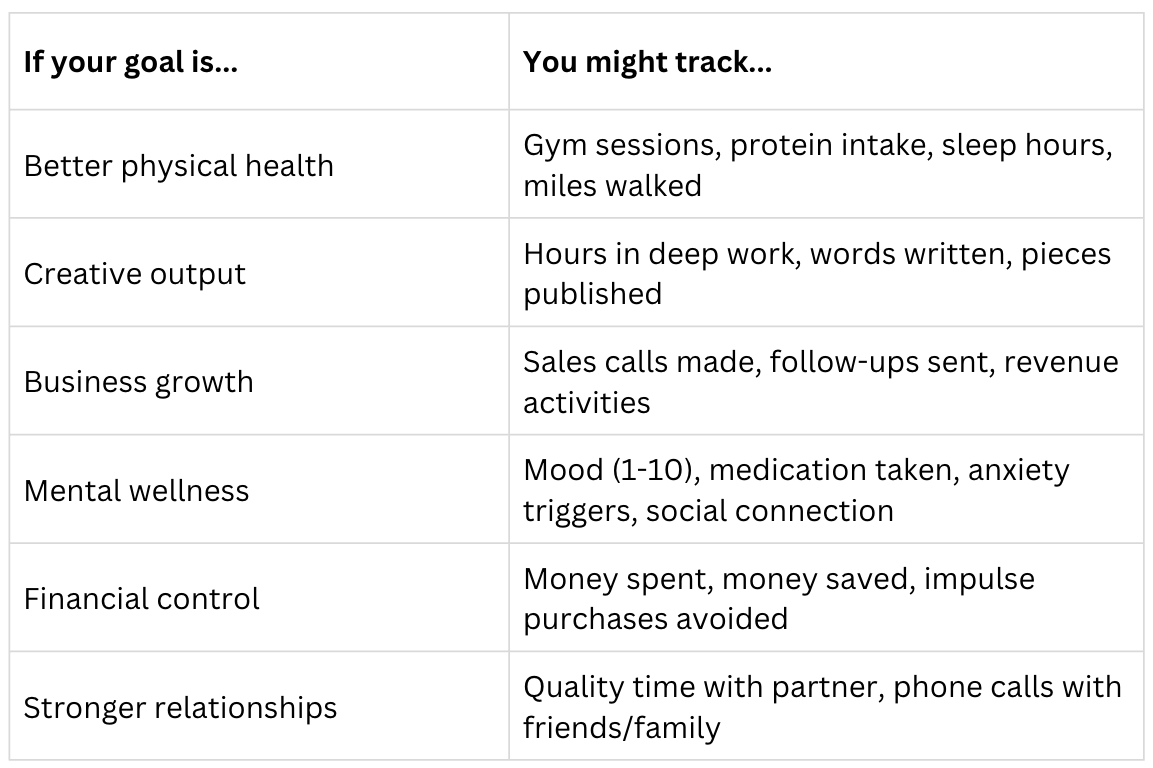
The rule: If you can’t answer it in under 5 seconds, simplify it.
WHAT A GOOD (SIMPLE) TRACKER LOOKS LIKE

This is a “table view” of the last few days of my personal tracker (make your own here). I like to track mine in Notion because you can simplify responses by using checkboxes or creating reusable “tags” for recurring events. For example, if you look at my “Gym” category: it’s technically a “Y/N” response, but I’m killing 2 birds with 1 stone by selecting the type of workout I did. My gym tags include: upper, lower, intentional rest day, too lazy. Having the “too lazy” option helps keep me honest with myself.
You’ll notice I do the same thing with “Miles Walked”—if miles = 0, the answer was “no.” Miles logged = “yes.” Try to consolidate and simplify your responses as much as possible to reduce friction at every turn. The less friction you encounter, the easier it will be to build momentum and keep going. I designed mine to take about 90 seconds total to fill out at the end of each day.
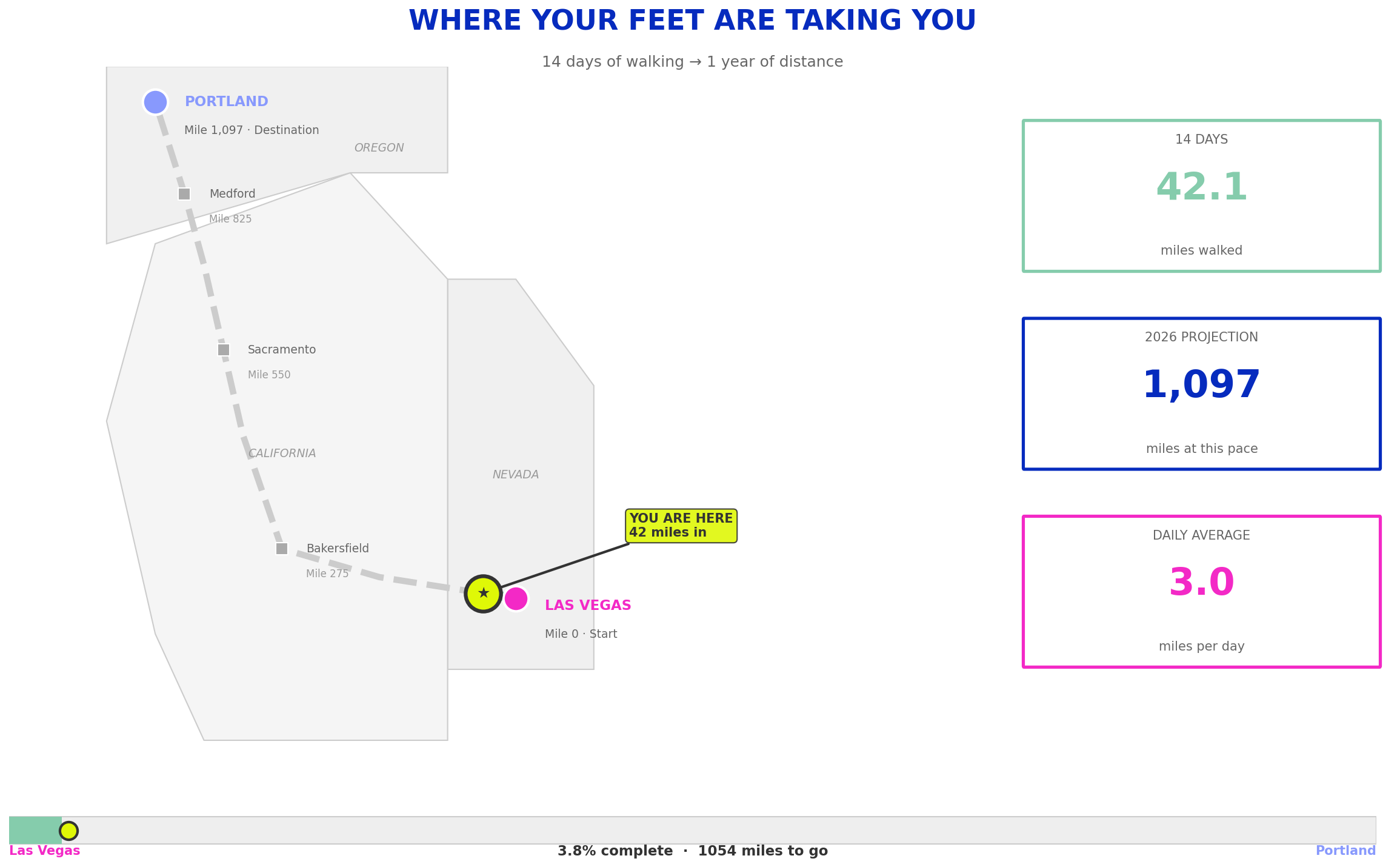
If you wear an Apple Watch, Oura Ring, or other type of fitness tracker, you can also merge that data here. I like to add my miles walked and my sleep hours to my tracker, which I get daily from my Oura Ring. It’s not necessary and is technically double-tracking, but it allows for more options for charts and graphs at the end of the week/month, which makes the overall data stories more interesting.
Here’s just one example of what I mean by “data stories”
COMMON MISTAKES TO AVOID
Tracking too many things → Start with 5-10. Add more later if needed.
Making it too complicated → If it takes more than 90 seconds to fill in, simplify.
Waiting for the “perfect” setup → Done beats perfect. You can adjust as you go.
Forgetting to do it → Set a daily phone reminder. Attach it to an existing habit (after brushing teeth, before bed, etc.)

ALREADY HAVE A SOLID JOURNALING HABIT? YOU CAN GO DEEPER.
The 90-second tracker is designed for building the habit from scratch. Minimum friction, maximum consistency. If you’re new to daily tracking, start there and don’t add anything else until it feels automatic.
But if you’ve been journaling or tracking for a while and you know you’ll show up regardless, you can add richer data points that take more time but pay off in interesting ways.
Some things I track that AREN’T yes/no or numbers:
Quotes I loved — Lines from books, podcasts, articles that stuck with me. At the end of the year, I’ll have a collection of everything that shaped my thinking.
Media consumed — What I watched, read, listened to. Not a rating, just a record. Helps me see where my attention actually went vs. where I thought it went.
What I created — Not just “did I create?” but what specifically. “Wrote 800 words on Jung.” “Edited Studio B draft.” This becomes a log of output I can look back on.
Things I found interesting — Random stuff that caught my attention. Patterns emerge over time.
Why this works for me: I’ve been journaling daily for years, so the habit is already sticky. Adding an extra 5-10 minutes doesn’t threaten my consistency. (My non-negotiables take 90-seconds to track, as I mentioned above. I consider these my “extra curriculars.”)
Why this might NOT work for you (yet): If you’re just building the tracking habit, every extra minute is friction, and friction kills habits before they become automatic. Start with checkboxes. Graduate to the richer stuff once showing up feels effortless.
Earn complexity. Don’t start with it.
Questions on getting started? Feel free to reach out. I read everything! :)
I hope you’ll join me in being a data nerd in 2026. It’s so much fun to see your life through this lens! 🤓

Easy, functional, gold. Best of luck to everyone in 2026!
Ooooh, thanks for doing this!